Kaizen DSP / Technical Articles / Updated April 2026
The State of Chorus DSP in 2026: Architectures, Artifacts, and the Math Behind the Sound
Most chorus plugins are black boxes. You load TAL-Chorus-LX, or Arturia's Chorus JUN-6, or Valhalla's modulation tools, and something musically useful happens to your audio. But nobody shows you what. Nobody explains the trade-off you're making when you pick BBD emulation over linear interpolation, or why multi-tap ensemble spreading sounds different from simple LFO modulation, or what happens to phase coherence when you push a warp oscillator into non-uniform territory.
This article is a walkthrough of five fundamental DSP architectures that define modern chorus plugins, written from the perspective of someone who implemented all five from scratch. I'll show you the actual signal math in each case, and what it looks like inside Choroboros' DevPanel when each algorithm is running — so you can make better decisions about which tool to reach for and why.
What the DevPanel is: Choroboros ships with a built-in developer telemetry panel. It shows real-time signal flow, frequency response curves, LFO phase integrators, BBD staging, interpolation coefficient matrices, and the DSP trace log — the same data I look at while building these engines. This article uses DevPanel captures as the visual evidence for every claim.
Contents
BBD Emulation: Why Vintage Chorus Sounds Warm and Dark
The Juno-60 chorus is probably the most imitated effect in plugin history. TAL-Chorus-LX is the most famous free implementation, and Arturia's Chorus JUN-6 is the paid reference. Both are trying to emulate the same thing: a Bucket Brigade Device circuit, specifically the MN3101/MN3102 chipset Roland used in the original hardware.
A BBD is an analog shift register. Audio passes through a chain of capacitors, each holding a sample charge and passing it forward on each clock pulse — literally like water buckets in a line. The number of stages determines the delay length. The clock rate determines the pitch of the modulation. What makes BBD sound warm isn't magic: it's loss. High-frequency content degrades with every stage transfer. You get a built-in low-pass filter that gets darker as you add stages, and you get clock noise as an artifact of the sampling process.
To accurately emulate this digitally, you need three components:
1. A ladder filter that rolls off the high end the same way the capacitor chain does — typically a 4th or 5th order cascade. 2. A compander circuit that replicates the signal compression and expansion the original hardware used to reduce noise. 3. A delay line with fractional sample interpolation, because the modulating delay time isn't always a whole number of samples.
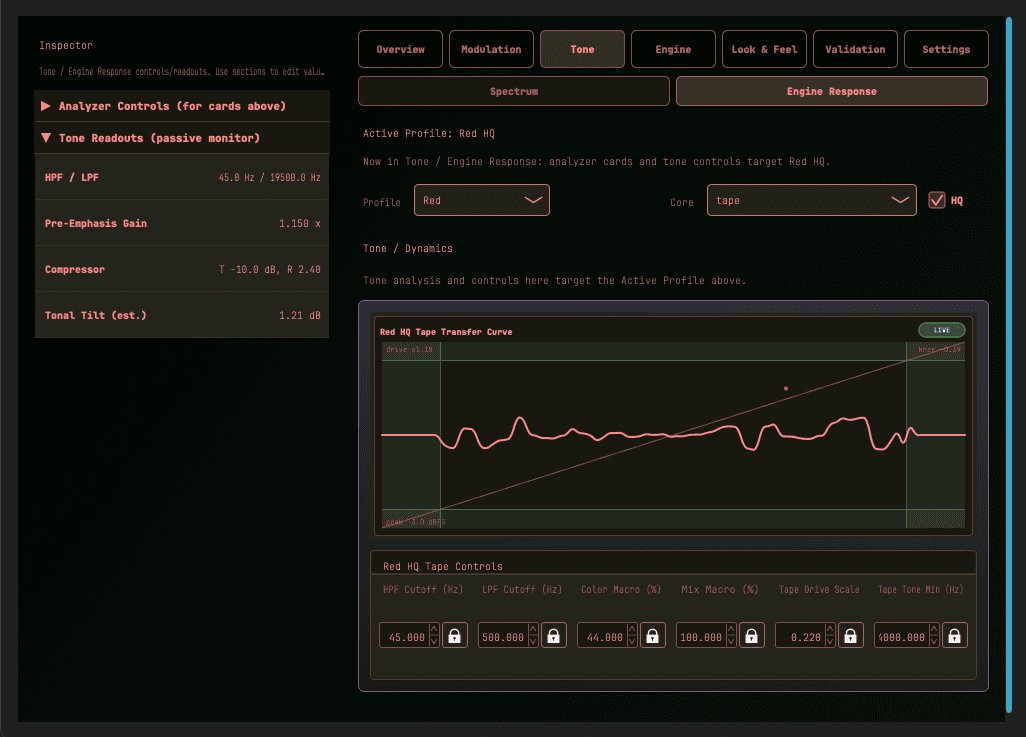
What you're seeing: The live tape transfer curve inside the Red HQ engine. This is the exact visual for what tape saturation looks like mathematically in real time as audio passes through. Inline telemetry shows the compressor clamping at T-10dB/R 2.40, a tonal tilt of 1.21dB, and the pre-emphasis gain pushed to 1.150x.
The tradeoff with BBD emulation is exactly what makes it distinctive: you are introducing coloration. The high end softens. The noise floor shifts. There's a subtle saturation at the poles of the BBD filter that adds harmonic density on transients. It's not transparent. For the right source — synth pads, electric piano, guitar, bass — this coloration is the whole point. For vocals or acoustic sources where you want width without character, it's the wrong architecture.
One thing worth knowing about the known BBD Stages + Depth 0% interaction in Choroboros' Red Engine (standard mode): when BBD stages are set above 768 with Depth at exactly 0%, you'll hear distortion. This is a staging clipping artifact under active investigation. The workaround is to keep BBD stages at or below 768. HQ mode is unaffected. I'm publishing this because it's the right thing to do — you should know what you're dealing with.
Polynomial Interpolation: The DSP Workhorse
Before we look at the extreme processing of Thiran allpass filters, we have to look at the industry standard for clean chorus: polynomial interpolation. This is what the Green Engine runs on. When a digital delay line needs to read a fractional sample value (like 2.7 samples ago), it uses interpolation.
Instead of drawing a simple straight line between two samples (linear interpolation, which dulls the high-end), Lagrange algorithms fit a complex polynomial curve through multiple surrounding samples to estimate the missing value. The higher the order of the polynomial, the more surrounding samples it looks at, and the more accurate the high-frequency reproduction becomes.
In Choroboros, the standard Green engine uses a 3rd-order Lagrange interpolator (looking at 4 points). This is highly CPU efficient and produces a very clean sound, but at extremely fast, deep modulation rates, it can introduce subtle phase errors in the upper treble. When you switch the Green Engine to HQ mode, it upgrades to a 5th-order Lagrange interpolator (looking at 6 points). This requires more CPU but extends the phase-accurate response much higher up the frequency spectrum, making it perceptually flawless for most mixing scenarios.
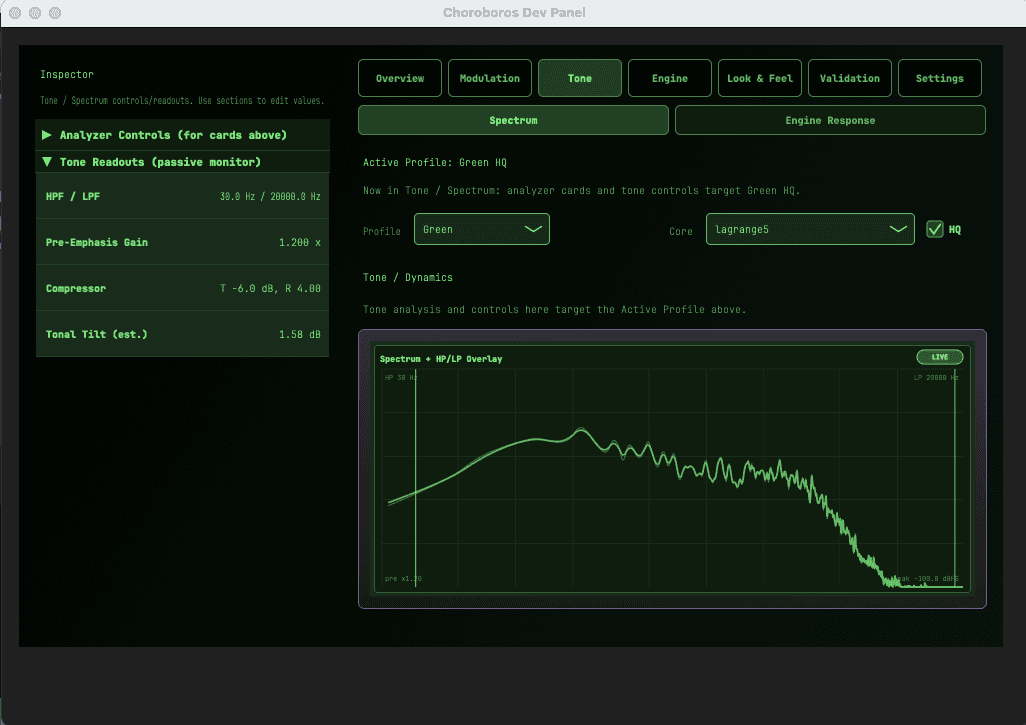
What you're seeing: The spectrum analyzer with HP/LP overlay parsing audio through the Green Engine (Lagrange 5th-order interpolation core). This shows the actual frequency content of the chorus in real time. For pristine chorus algorithms like Lagrange and Thiran, ensuring transparency means validating that the frequency response remains uncolored until explicitly filtered by the user.
For everyday chorus duties, Lagrange interpolation is the perfect middle ground. It's clean enough for acoustic guitars and backing vocals, but CPU-light enough in standard mode to be thrown across an entire drum submix without choking your session.
High-Order Allpass: The Math Behind Pristine Digital Widening
Tools like Acon Digital Multiply and many of MeldaProduction's modulation effects sit in a different category entirely. Their goal is width without coloration. For vocals, acoustic instruments, or any source where you want the chorus effect to be transparent and phase-coherent, BBD emulation is the wrong tool.
The key DSP problem here is fractional delay interpolation. When you modulate a delay line, you're constantly asking the algorithm: "what would the signal have been at 2.7 samples ago?" That's not a sample that exists. You have to estimate it. How you make that estimate determines the entire character of the effect.
The cheap answer is linear interpolation: draw a straight line between the two nearest samples and read off the point. It's computationally trivial and it introduces significant high-frequency attenuation at high modulation rates — a subtle dulling of the sound.
The expensive answer is Thiran allpass interpolation. A Thiran allpass filter is a maximally flat group delay filter — it estimates fractional sample values with phase accuracy across the full audible spectrum. The group delay stays flat, which means different frequencies arrive at your ears at the same time. The chorus sounds wide without sounding "chorused." This is what professional mixing engineers reach for when they want to thicken a vocal without it sounding like an effect. In Choroboros, the current Blue HQ path in v2.05 is the rebuilt release version of that idea — the one that survived the artifact cleanup, reduction work, and final stability pass.
The alternative high-quality option is 5th-order Lagrange interpolation. Lagrange fits a polynomial through 6 surrounding samples to estimate the fractional point. It's excellent for slowly varying modulation but introduces phase error at high modulation rates. Thiran is better suited to the faster modulation rates typical in chorus — which is why I use Thiran in the Blue HQ engine and Lagrange in the standard mode where CPU overhead is the priority.
For chorus plugin for vocals decisions: if transparency matters — if you're treating lead vocal or acoustic guitar — this is the architecture you want. If you want character and color, it's the wrong one.
Multi-Tap Ensemble Spreading: Synthetic Width at Scale
D16 Group's Syntorus 2 is the reference here for many synth producers. The Roland Dimension D is the hardware equivalent. The goal isn't to model a specific vintage sound — it's to spread a signal across a large stereo field using multiple detuned delay lines running at slightly different rates.
A basic chorus uses two delay lines: one per channel. An ensemble processor uses four, six, or eight, each with an LFO running at a slightly different phase offset and rate. The result isn't a doubled sound — it's a cloud. Synth pads, string machines, and heavily layered sounds respond to this in ways they don't respond to simple BBD treatment. The width is enormous and the source feels much bigger than it actually is.
The critical parameter is LFO phase offset. When left and right channel LFOs are in phase (0°), you get a mono-compatible widening that stays coherent in mono. At 90° you start to get stereo motion. At 180°, the channels fully decouple — the left and right side are moving in opposite directions simultaneously. This is where the massive, surround-sound-adjacent width comes from. It's also where mono compatibility starts to break down, which is a real concern in professional mixing contexts.
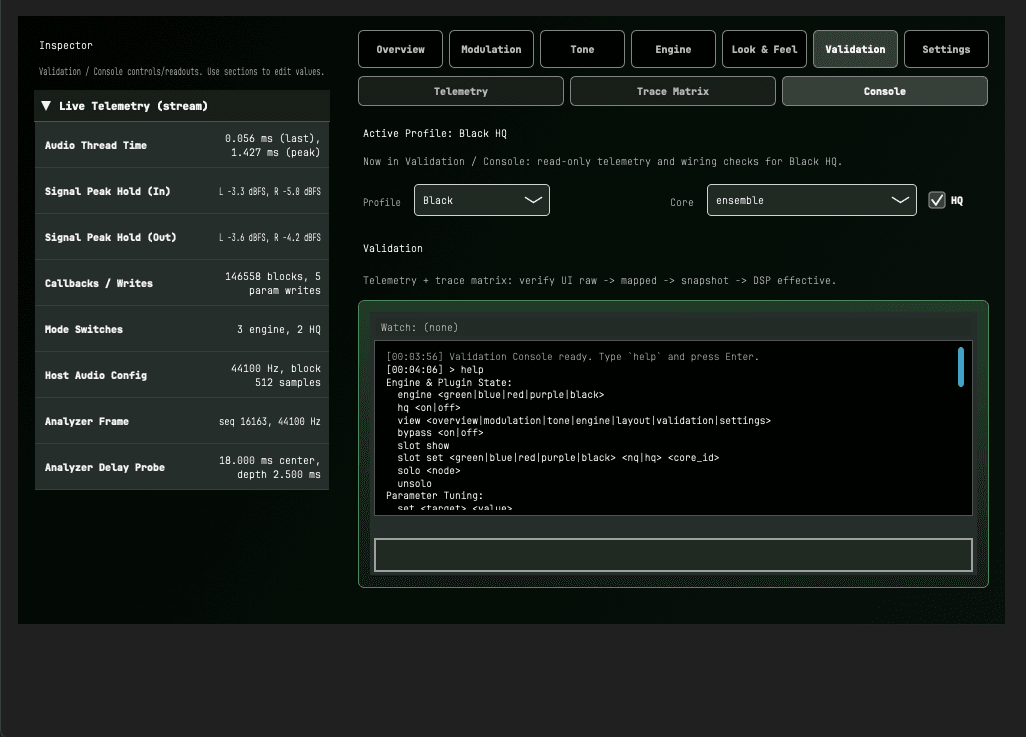
What you're seeing: The command line terminal of the Black HQ Ensemble engine environment. This allows devs (and power users) to live-execute vocabulary commands — mode switches, slot bypassing, mono soloing — while monitoring thread times and callback counts in real time. It's the raw backbone of managing an engine that branches into multiple parallel delay paths.
For chorus plugin for synth and chorus plugin for pads decisions: multi-tap ensemble is the architecture you want when the source is already harmonically dense and you want to push width without changing character. It works poorly on transient-heavy sources because the phase offsets smear attacks. Use it on sustained material.
Non-Uniform LFO Modulation: Phase Chaos as a Creative Tool
This is where we leave emulation territory entirely. Tools like Valhalla's modulation effects have built their reputation partly on doing things that classical chorus architectures weren't designed to do — using modulation to push audio into non-linear, perceptually unstable territory.
A standard LFO produces a uniform waveform: sine, triangle, or square. The delay time modulates smoothly and predictably. The phase cancellation pattern is symmetric. You get the standard chorus effect.
A warp oscillator does something different. It maps the LFO output through a non-linear transfer function — a waveshaping curve that compresses part of the waveform and expands another. The result is a delay modulation pattern that's asymmetric: it moves slowly through part of the cycle and rapidly through another. The audio hears this as an irregular, unstable modulation — sometimes the delay barely changes, sometimes it jumps. The phase cancellation pattern rotates unevenly around the stereo field. It's harder to predict and harder to control, which is either the feature or the bug depending on what you're going for.
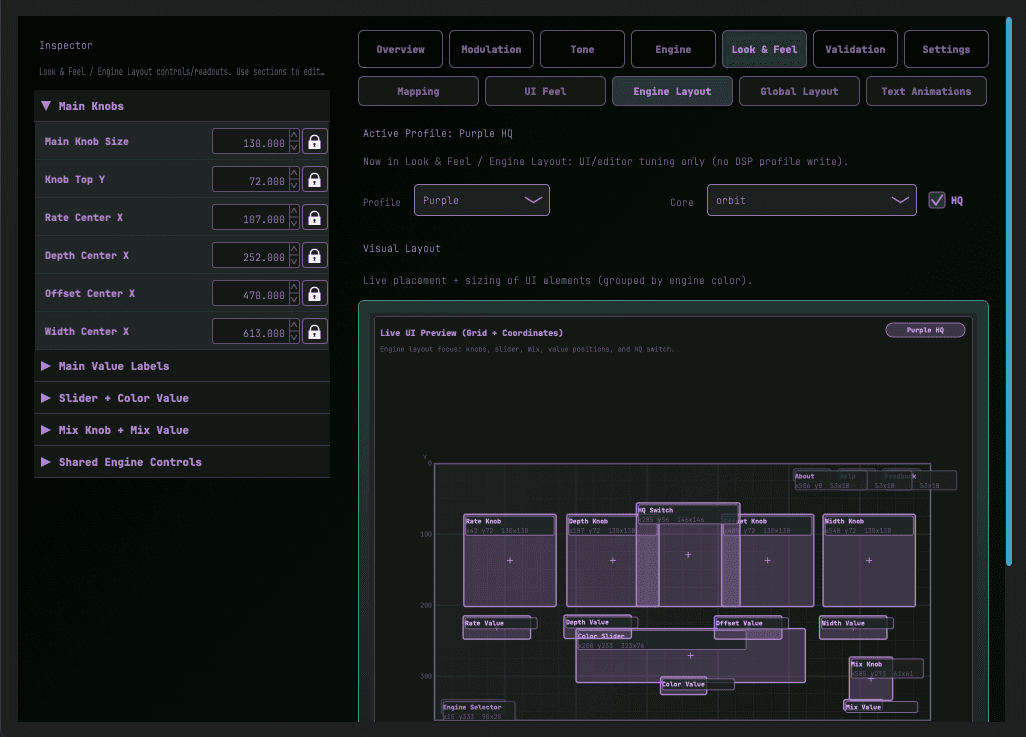
What you're seeing: The live layout wireframe editor running in the Purple engine context. It displays exact pixel dimensions, bounding boxes, and component coordinates. A warp engine breaks norms mathematically, so giving users the ability to break them visually through a live .chor layout builder reinforces that chaos.
The practical use case is experimental sound design and character effects on sources that can absorb instability: electric guitar, synthesizers with fast attack and sustain, sound design elements. It's not a mixing tool in the conventional sense. It's a transformation.
One note for those who've used Valhalla's tools here: the comparison isn't that Choroboros' Purple engine does what Valhalla does. It's that both tools are drawing on the same insight — that non-uniform phase modulation creates perceptually distinctive artifacts that a standard LFO can't produce. The implementations are different. The underlying idea is the same.
Which Architecture for Which Job
The five architectures above aren't interchangeable. Here's a quick-reference summary of the trade-offs:
| Architecture | Best For | Trade-Off | Choroboros Engine |
|---|---|---|---|
| BBD Emulation | Synth pads, guitar, vintage character, lo-fi | Colors the sound. Not transparent. Clock noise artifact. | Red |
| Polynomial Interpolation (Lagrange) | General width, smooth modulation, low-CPU clean tasks | Slight high-frequency phase error at very fast rates (Standard mode) | Green |
| High-Order Interpolation (Thiran) | Vocals, acoustic, anything where transparency matters | High CPU cost. No character. | Blue HQ |
| Multi-Tap Ensemble | Dense synth patches, strings, pads, massive width | Smears transients. Mono compatibility degrades at high phase offsets. | Black |
| Non-Uniform Warp LFO | Experimental, sound design, transformation | Unstable. Not a mixing tool. High learning curve for musical use. | Purple |
The reason Choroboros implements all four in one plugin — instead of doing one architecture well and shipping it — is that these are genuinely different tools for different jobs. Switching from BBD to HQ interpolation to ensemble in a single session shouldn't require opening four different plugins. The DevPanel exists so the choice isn't arbitrary: you can see what's actually happening to your signal and make a decision based on evidence.
Choroboros has closed its public beta, and the code remains open on GitHub. Free binary releases are no longer public downloads. If you've spent time with any of the plugins mentioned in this article and want to look under the hood at how this class of DSP actually works, the DevPanel is the place to start.
Choroboros Release Status
5 engines. 10 algorithms. Full DevPanel telemetry. Invitation-only private beta is underway; public release is pending.
View Release StatusFree beta binaries are no longer public downloads